Key Terms
Wearable Device. An electronic device worn close to and/or on the surface of the skin, where they detect (and sometimes analyse) information concerning behavior and physiology (acceleration, temperature, body position, heart rate, breathing rate, blood pressure, oximetry) and/or environment data (light exposure, temperature).
Actigraphy. It may not be the official definition, but here in Cicada we refer to ‘Actigraphy’ as the complete set of measurements of behavior, physiology and environment which must include ‘Accelerometry’.
Accelerometry. In Cicada we refer to ‘Accelerometry’ as the specific measurements of acceleration (often through a wrist-worn device).
Dataset. A comprehensive collection of various types of data that pertain to a single data acquisition session with one or mode devices. The Dataset also includes, but is not limited to, the Raw Data from e.g. the Accelerometer, the derived Metrics, Statistics and information about the recording, study and participant. Cicada uses the Matlab class
structto store the Dataset.(Raw) Data. The collection of data that are downloaded from the wearable devices. In most instances, this is Raw Data, e.g. acceleration in ‘x’, ‘y’, and ‘z’ directions from an Actiwatch, but it can also be derived data, e.g. instantaneous heart rate from a wearable ECG device.
Sampling Rate. The number of datapoints per unit of time.
Epoch. The length of a time segment in seconds over which Raw Data is synchronized.
- Epoched Metrics. In order to properly analyse the Raw Data from various different types of wearable devices, Cicada needs to synchronize their timeseries that have a common Epoch length. In addition, the same Raw Data can be transformed into various Metrics. For example, the acceleration in ‘x’, ‘y’, and ‘z’ directions are used to compute the ‘Euclidean Norm’ Metric, but also to compute the ‘Angle’ Metric.
Euclidean Norm. The length of the 3D vector
[x, y, z]given bysqrt(x^2 + y^2 + z^2), wherex,yandzare the instantaneous acceleration in g’s (9.81 \(m/s^2\)).Angle. The angle of the accelerometer with respect to the ‘z’ axis, given by
atan(z/ sqrt(x^2 + y^2)) / (pi/180), wherex,yandzare median acceleration values in g’s in moving windows of length ‘Epoch’.Activity Counts. Derived activity counts in arbitrary units from the Accelerometry data according to B.H. Te Lindert et al. (2013) Sleep (DOI: 10.5665/sleep.2648).
Other derived Epoched Metrics are simply down- or upsampled values for each Epoch.
Preprocessing. The steps to make sure the Epoched Metrics are suitable for Analysis. For example, we might need to calibrate the Raw Data and recalculate the Epoched Metrics, or we might need to create Reject Events (see definition below) to indicate which sections of the Epoched Metrics should be disregarded in the Analysis.
Analysis. The steps to identify which parts of the Epoched Metrics can be grouped together under a common label, such that they can be selected to calculate Statistics for (see definition below).
Annotation. The assignment of a categorical or ordinal label to each Epoch of a particular datatype based on a thresholding method, e.g. ‘low’, ‘light’, ‘moderate’ and ‘vigorous’ activity levels for ‘acceleration’ Metrics, or ‘dim’, ‘moderate’ and ‘bright’ exposure levels for ‘light’ Metrics.
- Events. Segments that are defined by an onset and duration and identified by a unique label. In addition, the event type identifies the origin of the event, e.g.
manualfor user-defined events, orGGIRfor events created by GGIR algorithms. Reject Event. An event that identifies a segment that should be disregarded in calculating statistics, e.g. time periods where a devices was not worn.
Button Events. An event triggered by a button press on any of the wearable devices by the research participant. Button events have no duration.
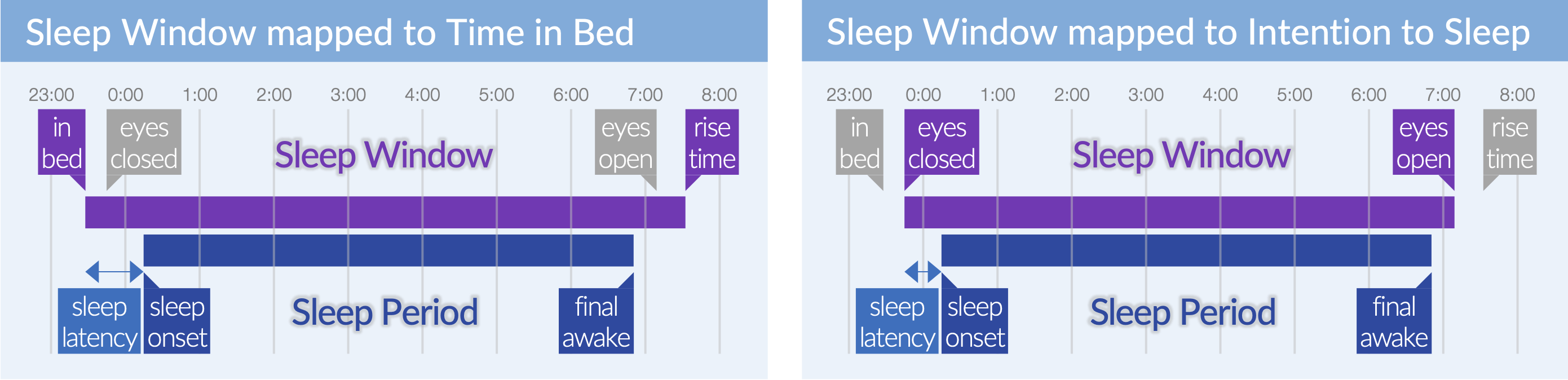
Sleep/Nap Window Events. A time period in which the research participant is in bed (in bed until rise time), or a time period in which the research participant intends to sleep (eyes closed until eyes open).
Sleep/Nap Period Events. A time period in which the research participant is asleep, excluding ‘wake-after-sleep-onset’ events (sleep onset until final awakening).
Note
It is virtually impossible to distinguish between ‘in-bed’ windows and ‘intend-to-sleep’ windows if the only information available to the user is Actigraphy. However, when Sleep Window Events are determined by a sleep diary, it is the user’s choice to define the Sleep Window Events as the window in which the participant reported to be in bed, or the window the participant reported to have the intention to sleep. Any sleep variable that is derived from the Sleep Window and Sleep Period, e.g. sleep latency, is affected by this choice, e.g. sleep latency relative to the time in bed is different from sleep latency relative to eyes closed.
WASO Events. Short for ‘wake after sleep onset’. WASO events are defined as segments during the Sleep Period in which the acceleration annotation is not ‘sustained inactive’ (Event type is
actigraphy) or as segments the participant reported to be awake during the night (Event type issleepDiary).Custom Events. Events that are defined by the user.
- Events. Segments that are defined by an onset and duration and identified by a unique label. In addition, the event type identifies the origin of the event, e.g.
Statistics. Any variable of interest that is calculated across the entire recording, per day in the recording, per Sleep Window, or for each unique label in Custom Events.
Advanced terms
The next set of terms are not necessary to understand if you just want to use Cicada, but they are useful for anyone who would like to contribute to the code.
Component. Any Matlab object, e.g.
axandparentare Components in the lineax = uiaxes(parent).Property. Any field of the Component, e.g.
XLimis a Property of the UIAxesax, and can be accessed using the dot-notationax.XLim.Trigger. Any user interaction with the user interface, e.g. a mouse click or key-stroke.
State. The complete set of values in the Dataset.
Lifecycle. The main function that is called after a Trigger, which is responsible for calling the sequence of functions to update any relevant Property based on the State.
Mount. The initial creation of a Component.
Construct. The act of mapping the current State to the relevant Properties of a Component.
Update (a Component). The act of setting the updated Property values of a Component.